
Key takeaways
What matters before you keep reading
01
A tech pack turns garment references, sketches, measurements, materials, and construction decisions into one production document.
02
A complete apparel tech pack usually includes garment views, callouts, measurements, grading, BOM, construction notes, colorways or artwork when relevant, labels, packaging components, and export structure.
03
AI is most useful when it generates a strong first draft that the team can review before factory handoff.
Reader guide
Reader guide
A quick frame before the workflow details.
For
Founders, designers, product developers, and apparel teams preparing a style for sampling or factory outreach.
Read when
Best read before creating a first tech pack, contacting a manufacturer, or comparing templates with AI-generated drafts.
You'll get
A clear definition, complete section breakdown, common mistakes, and examples from a generated tech pack.
On this page
Follow the article through the long read and keep your place.
On this page
11 sections
A tech pack is the document that tells a manufacturer what to make, how to make it, and which dated garment handoff the team wants reviewed for sampling or production.
Sketches, reference photos, and design notes are useful inputs. A tech pack turns those inputs into a structured production document with sections a factory can quote, sample, and review.
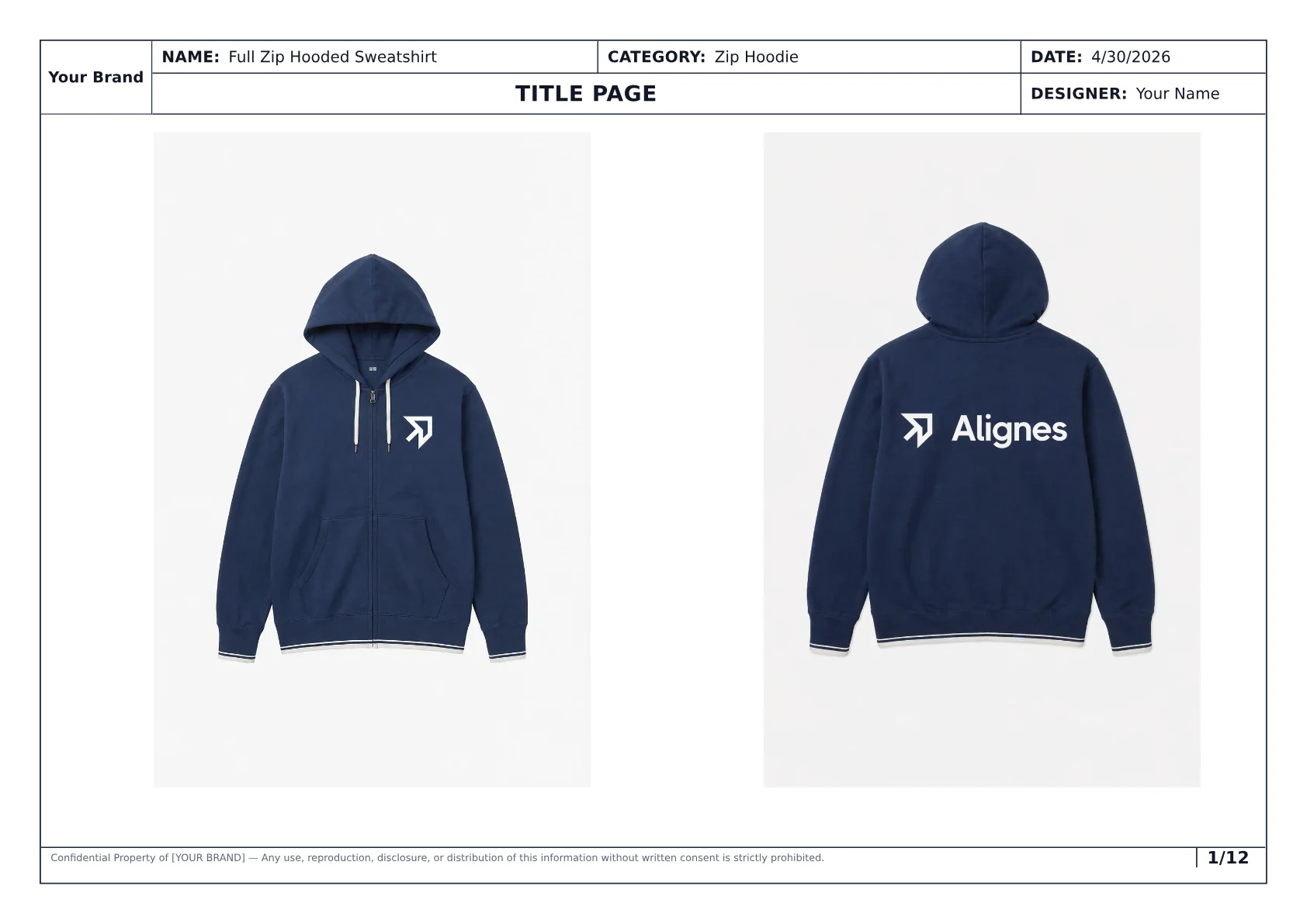
A strong tech pack starts by giving the factory a clear style overview, date, sample size, and visual context before the technical pages begin.
What a tech pack does
A tech pack removes guesswork from the handoff between design and manufacturing. It answers the questions a factory would otherwise ask by email:
- What garment is this?
- Which sample size and size range matter?
- What should the front, back, and detail areas look like?
- What are the key measurements and points of measure?
- Which fabrics, trims, labels, and artwork belong in the garment?
- How should seams, panels, stitches, closures, finishes, and placements be built?
- Which colorways, artwork details, and export file should be reviewed?
The document does not replace judgment. It makes the team's current decisions visible enough for the factory to quote, sample, and flag what still needs review.
What a complete apparel tech pack includes
Many tech pack guides stop at a generic component list. The production value comes from seeing how those components work together as one document.
| Section | What it tells the factory | Why it matters |
|---|---|---|
| Cover and style overview | Style name, category, sample size, size range, date, and visual context | Keeps the pack tied to one current garment |
| Garment views and callouts | Front/back views plus annotated construction and detail notes | Turns the visual idea into production-readable instructions |
| Measurements and POMs | Base-size measurements, points of measure, units, and grading logic | Gives sampling and fit review a measurable target |
| BOM and materials | Fabrics, trims, labels, hardware, threads, artwork, and component notes | Helps sourcing, costing, and production avoid substitutions |
| Construction details | Seams, stitch types, finishes, panel behavior, closures, and operations | Reduces interpretation risk during sample making |
| Colorways and artwork | Color variants, placement, print or embroidery notes, and brand details | Keeps visual variation connected to the same style |
| Export and handoff notes | PDF/export file, date, and document context | Prevents factories from working from stale files |
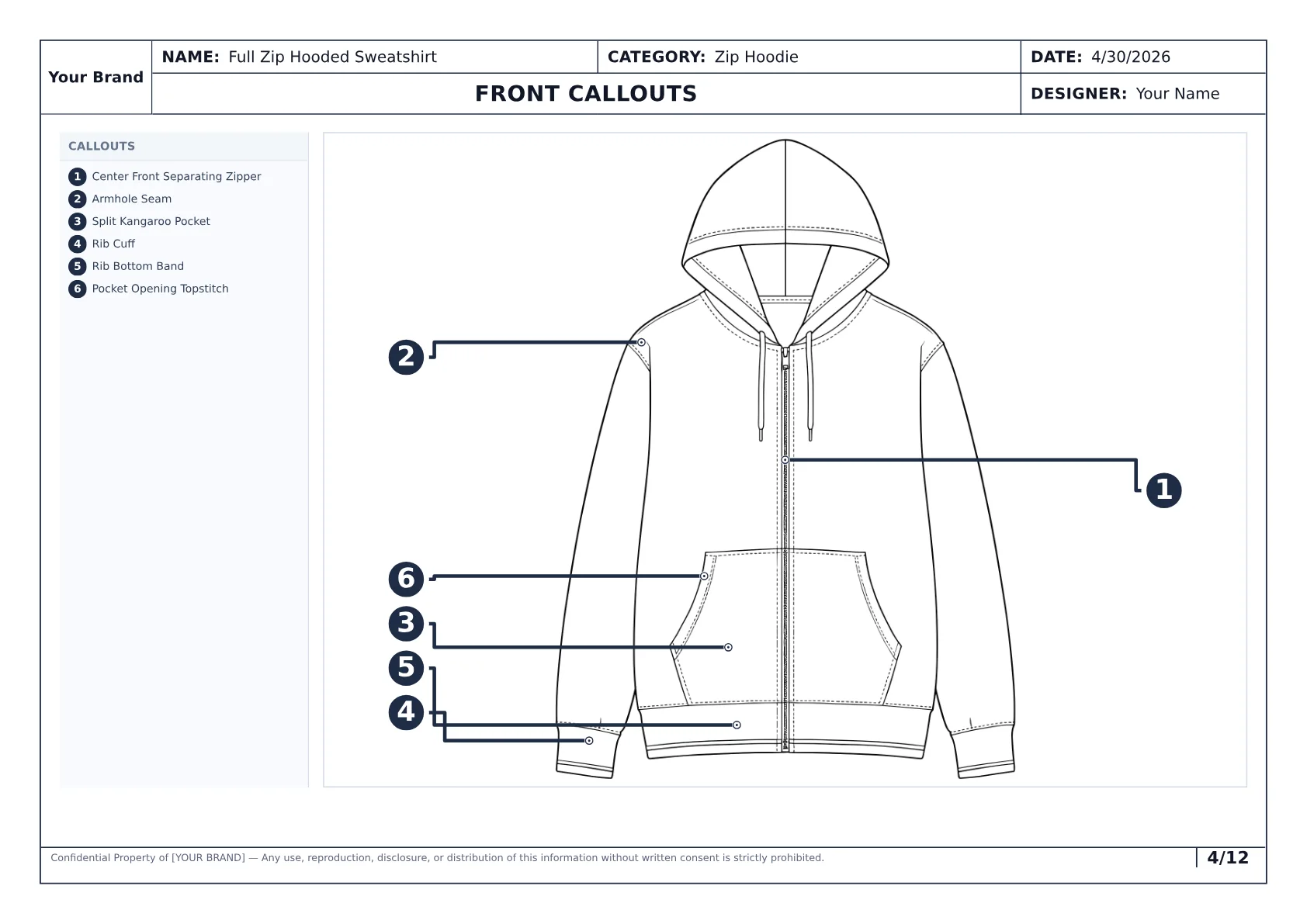
Callouts make the pack more useful than a blank template because the construction and placement details are already attached to the garment view.
Cover page and style overview
The cover page gives the factory the frame before it reads the technical details: style name, garment category, sample size, size range, date, and visual direction.
Weak cover pages leave the factory wondering which garment, sample size, or dated document it is looking at.
Strong cover pages make the garment context obvious.
Garment views and callouts
Technical garment views show the style without campaign context. Include construction-relevant front and back views.
Callouts explain details that a flat cannot communicate by itself:
- pocket shapes and placements,
- seam locations,
- cuff, hem, and waistband construction,
- zipper, button, drawcord, or hardware behavior,
- print, embroidery, patch, or label placement,
- construction changes between views or colorways.
For AI-generated tech packs, this is one of the most important proof sections. A shallow generator may create a pretty visual. A stronger generator needs to turn references into usable garment annotations.
Measurements, POMs, and grading
Measurements tell the factory what the garment should measure at the sample size. Points of measure explain where those measurements are taken.
Include these measurement details:
- the base sample size,
- named points of measure,
- measurement values and units,
- graded measurements or size-range notes,
- notes for measurements that require review.
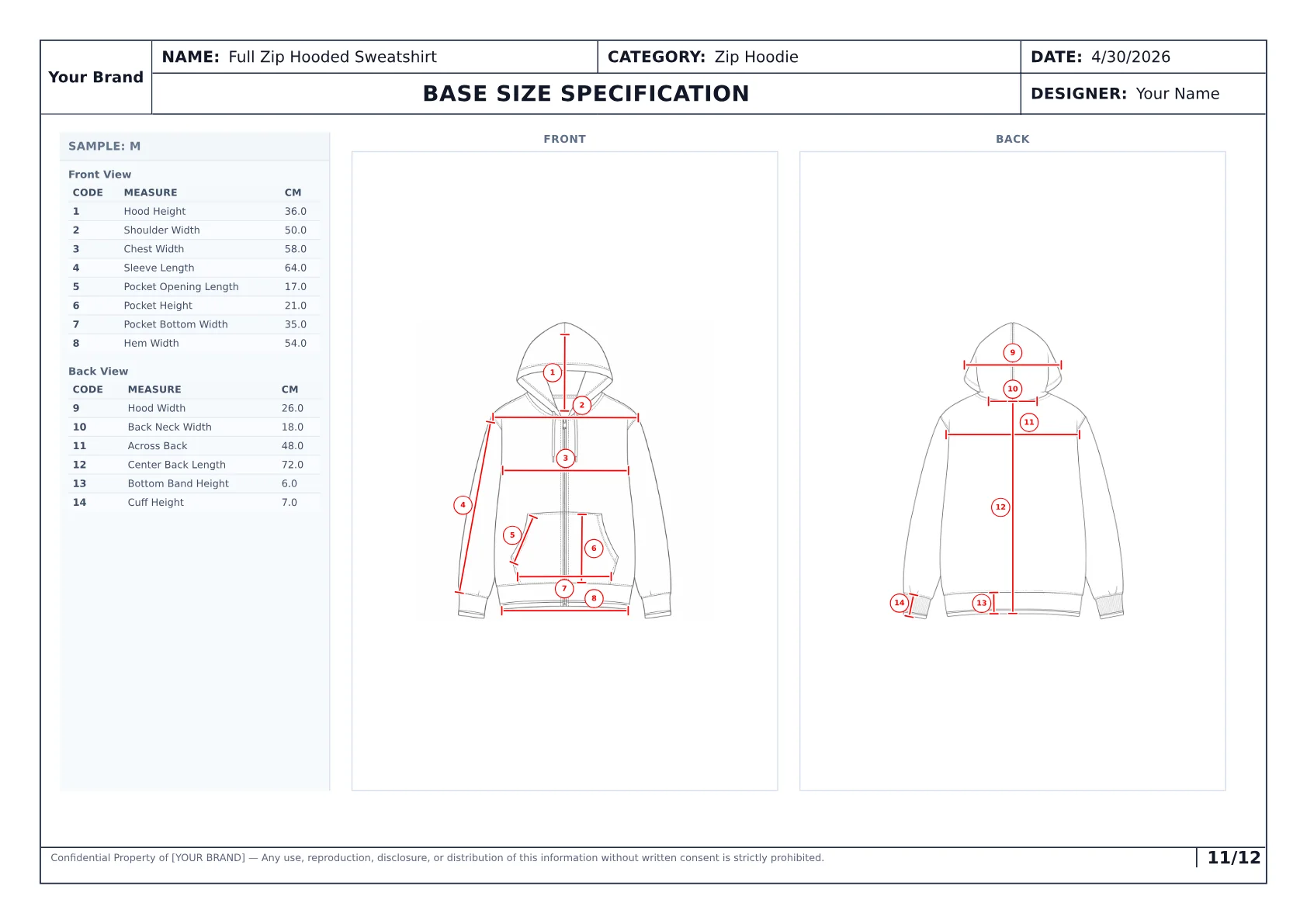
The measurement page is where a generic visual becomes a production document. It gives the team and factory measurable targets to review.
BOM, trims, and fabric details
The bill of materials describes what the garment is made from. A usable BOM does not just say "cotton" or "zipper." It separates the components the factory needs to source, quote, and assemble.
A tech pack BOM can include:
- shell fabric and lining,
- rib, mesh, facing, tape, or reinforcement materials,
- trims and hardware,
- labels and care information,
- artwork applications,
- thread and stitch notes,
- supplier/source notes if already selected.
This is where template-only workflows often break. A blank BOM table is only structure. A generated draft should help populate the structure from the garment references and notes, then let the team review what needs correction.
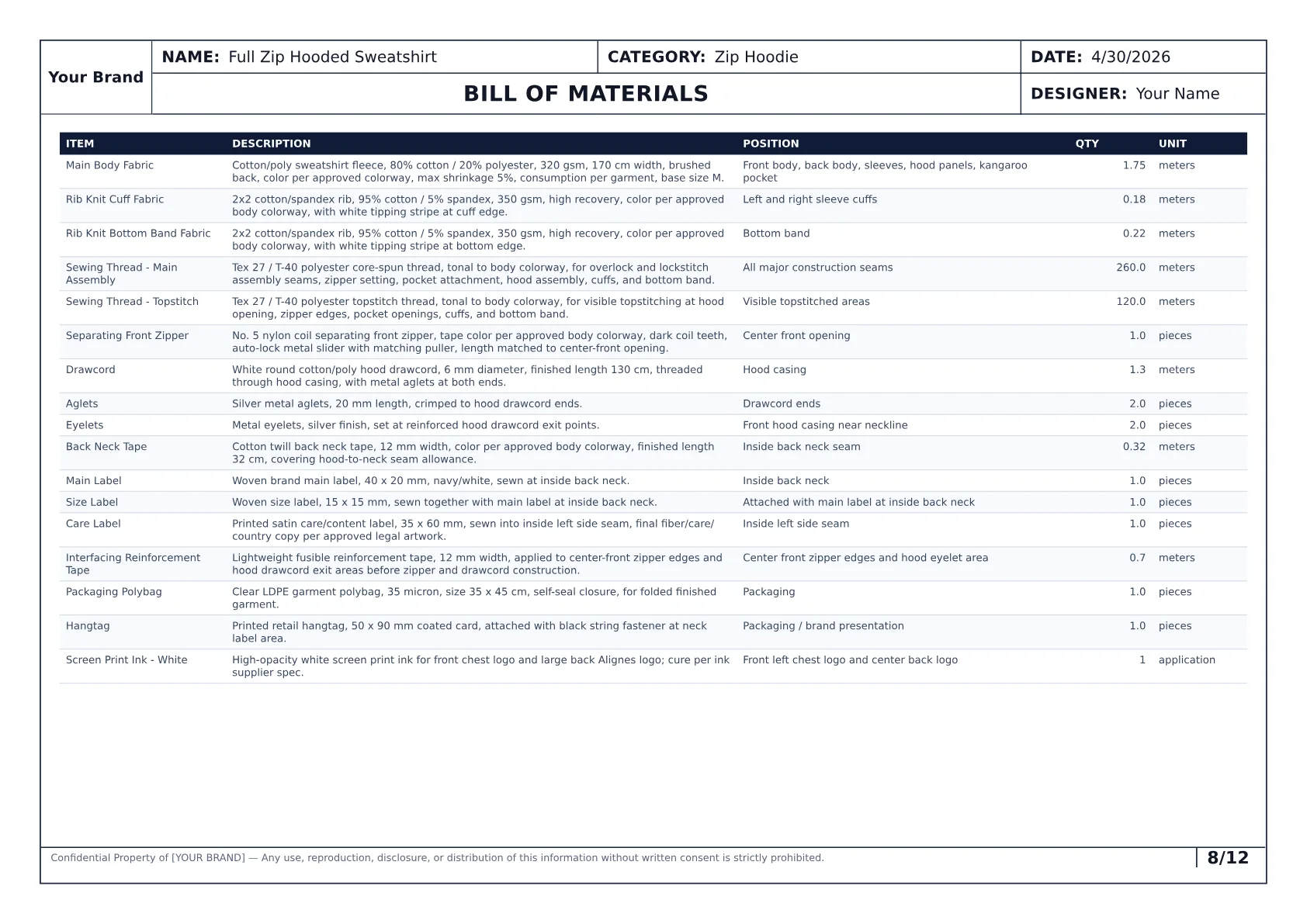
A filled BOM makes the handoff easier to inspect because the material and trim assumptions are visible instead of hidden in loose notes.
Construction details and operations
Construction notes explain how the garment should be built. This is where the pack gives the sample room more than a silhouette.
Useful construction sections describe:
- seams and stitch types,
- panel relationships,
- reinforcement or topstitching,
- closures and openings,
- pocket construction,
- hood, collar, cuff, hem, or waistband finishing,
- any operation that should not be left to factory interpretation.
When people say a tech pack looks polished but is not usable, this is often the missing layer. The document may contain visuals and measurements, but not enough build logic.
Colorways, artwork, labels, and packaging
Colorways, artwork, labels, and packaging can be simple in early sampling and more detailed later. The important thing is to keep assumptions visible.
If the colorway is confirmed, say so. If artwork placement is approximate, say so. If packaging is not in scope yet, say so.
Factories can work around pending assumptions when they are visible. They struggle when uncertain details look like final decisions.
What a factory can and cannot do with a tech pack
A factory can use a clear tech pack to:
- quote with fewer missing inputs,
- create a first sample,
- check measurements during fit review,
- source materials and trims,
- align pattern, sampling, and production teams,
- review updates against one current document.
A factory cannot use a vague tech pack to read your mind. If the BOM is empty, measurements are missing, construction is unclear, or artwork is not placed, the factory will either stop and ask or make assumptions.
Comparison
A weak tech pack looks like a document. A strong tech pack works like a handoff.
The difference is not polish. It is whether the factory can see the decisions it needs before sampling.
| Topic | Weak pack | Strong pack |
|---|---|---|
| Visuals | One sketch or reference image without production detail. | Front/back garment views with callouts tied to garment areas. |
| Specs | Missing or unnamed measurements. | Base-size measurements, POMs, units, and graded measurements. |
| Materials | Loose fabric and trim notes. | BOM with components and material assumptions. |
| Handoff | Several files and unclear dated export. | One current export package with visible date, garment context, and page structure. |
How AI changes the first draft
AI helps most when the team already has garment direction but does not want to start the technical document from a blank template.
With Styneo, the workflow is:
- Upload garment images, sketches, references, and notes.
- Generate a structured tech pack draft.
- Review the generated specs, measurements, BOM, construction, callouts, colorways, and artwork.
- Adjust anything that needs human judgment.
- Export or share the reviewed pack before factory handoff.
That is different from asking a generic AI tool for a rough checklist. The goal is a structured production document with sections the apparel team can inspect.
AI generation workflow
From garment references to a reviewable tech pack draft
What changes across the process
- 01
Step 01
Upload garment references
Images, sketches, existing notes, and style context give the model a clear starting point.
- 02
Step 02
Generate structured sections
The draft organizes specs, measurements, BOM, construction details, callouts, colorways, artwork, and export structure.
- 03
Step 03
Review before handoff
The team checks the generated assumptions and keeps control before sending anything to a manufacturer.
The best AI tech pack workflow keeps generation and review together: create the first draft faster, then verify the details before the factory sees it.
Process showing garment references becoming a structured AI-generated tech pack draft
In practice
See what Styneo generates before you start from a template
The full hoodie example shows how garment references become a structured 12-page draft with measurements, BOM, construction details, callouts, colorways, artwork, and export-ready pages.
View generated tech pack examplesCommon mistakes in weak tech packs
The most common mistakes are not dramatic. They are ordinary gaps that create factory questions:
- sketches without measurements,
- measurements without named points of measure,
- BOM tables with vague materials,
- construction notes that say what the garment should look like but not how it should be built,
- artwork placement without size or method notes,
- colorways disconnected from BOM and artwork,
- old PDFs still circulating after a revision,
- no indication of what is final or pending.
If you want a send-ready list, use the related checklist on what should be included in a tech pack. If you need the actual creation workflow, read how to make a tech pack.
FAQ
Common questions, answered clearly.
Its purpose is to give the manufacturer one clear source of truth for how the garment should be sampled, quoted, and produced.
Next step
Generate the first complete draft instead of starting from a blank file
Styneo turns garment images, sketches, references, and notes into structured tech pack drafts with measurements, BOM, construction details, callouts, colorways, artwork, and export-ready pack structure.